
Personalization and additional properties
Steps
You don't have to display every property on the pass. Additional properties also work as hidden metadata, for example a contact ID from your CRM that you search for later. You also need them to send passes via email or SMS, because they store the recipient's email address or phone number.
Creating an additional property
- Open the template editor and go to Personalization.
- Add a new property and give it a Property Name. The name doubles as the placeholder. A property named
Namebecomes{Name}elsewhere on the template. - Choose a Type. Text, Email, Phone Number, Textarea, Checkboxes, Select or Radio Button.
- Save the template.
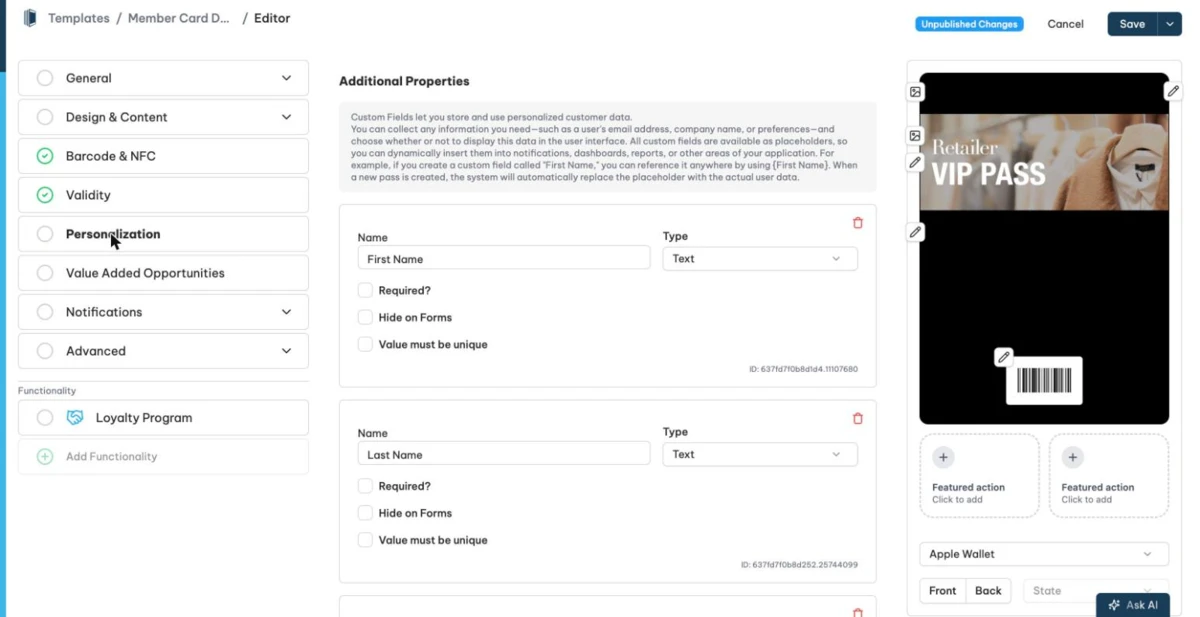
For the choice types Checkboxes, Select and Radio Button you enter the Options as a list separated by commas. You can enable Sort options alphabetically on public pages. Radio buttons need at least two options.
Each property has additional options.
- Required field? The value is mandatory when you create a pass.
- Hide on Forms. Public forms do not show the property.
- Value must be unique. No two passes of the template share the same value.
Use to send One-Time-Password in Forms. For the types Email and Phone Number. Passcreator uses the property to send a one time password for verification on forms.
Using placeholders
Once defined, use the placeholder in field values, the barcode value, change messages, links, the welcome push message and more. The editor autocompletes placeholders as you type and warns about unknown ones with Invalid or Non-existent placeholders.
Placeholder functions
You can wrap placeholders in functions.
{urlencode({yourPlaceholder})}. Converts the placeholder value into a URL safe format. An example for a QR code that encodes a URL ishttps://yourdomain.de/?name={urlencode({firstName} {lastName})}.{sign({yourPlaceholder})}. Generates a cryptographic signature of the given values for tamper protection. Your system verifies the signature with the public key from the Passcreator API. If the signature matches the data, Passcreator created the data and nobody has modified it.
Deleting a property
Checked 2026-08-20 · Documentation