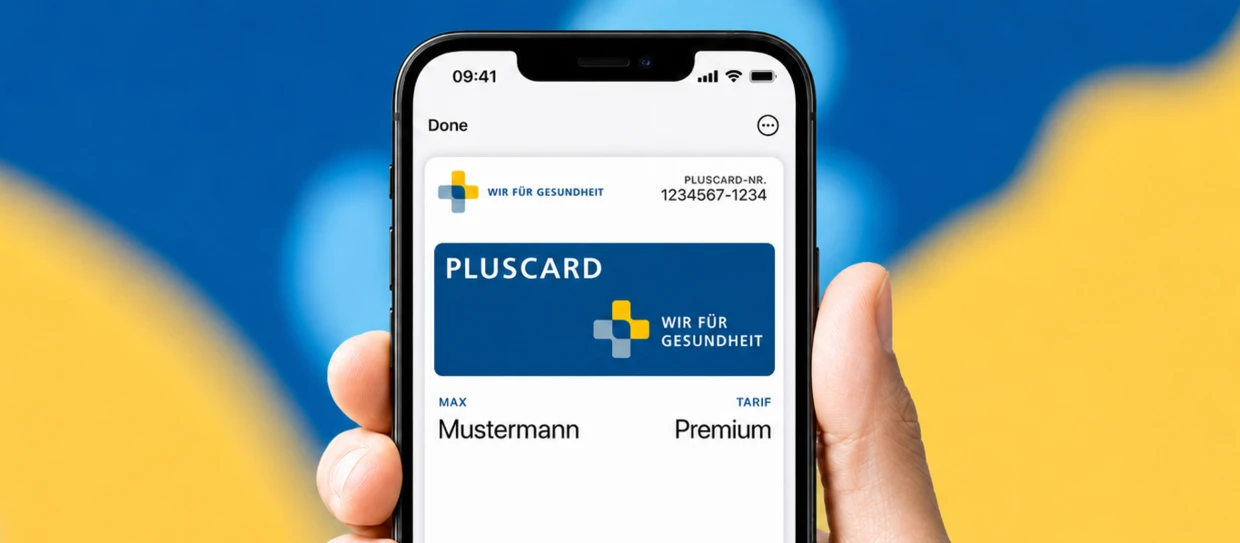
Plastic cards gathering dust in wallets. PDF documents that no one can find when they need them. And calls to the call center just to look up an insurance number. What if all of that were unnecessary because your customers’ proof of insurance is right where they look anyway: on their smartphones, in Apple Wallet or Google Wallet?
Wallet Passes make exactly that possible. And for the insurance industry, they open up opportunities that go far beyond simply replacing a plastic card.
What is a Wallet Pass and how does it work as a digital insurance card?
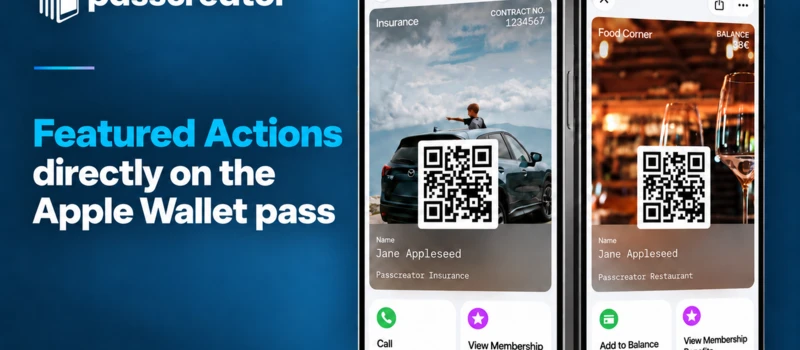
A Wallet Pass is a digital card stored directly in Apple Wallet or Google Wallet without the need for an additional app. You can think of it as a digital counterpart to a physical insurance card: insurance number, coverage details, contact information, and relevant details are always available on the smartphone’s lock screen.
The key difference from a traditional card: A Wallet Pass is not static. It can be updated in real time, can send push notifications, and offers insurers a direct, digital communication channel to their policyholders—without any app download, login, or password.
Technically, the system is based on the Pkpass format (Apple) and the Google Wallet Object (Google). Passes are created and managed via a platform like Passcreator, which supports both ecosystems from a single interface.
Why the insurance industry should embrace Wallet passes now
The digital transformation of the insurance industry is advancing, but for many insurers, it stops at the customer interface. Customer portals are often cumbersome, apps are rarely downloaded, and the most important information—“Am I insured, and how do I prove it?”—is difficult to access in an emergency.
Wallet Passes solve this problem at its root:
1. Always with you, instantly accessible
Your proof of insurance is right where your boarding pass and credit card are. No searching through email inboxes, no logging into apps. A quick glance at your smartphone is all it takes—even offline.
2. Effortless real-time updates
Has your insurance coverage, plan, or phone number changed? The Wallet Pass updates automatically on the insured person’s smartphone. No need to print a new card or send an email.
3. Push notifications as a communication channel
Wallet Passes make it possible to send targeted messages directly to the lock screen, such as reminders for preventive checkups, notifications about rate changes, or seasonal health tips. Open rates significantly exceed those of email and SMS.
4. No app download required
Apple Wallet and Google Wallet are pre-installed on virtually every smartphone. This keeps the barrier for the user as low as possible—a single click on a link is all it takes to save the pass.
5. Cost reduction for insurers
Fewer plastic cards to print and mail, fewer call center inquiries about insurance numbers, and less administrative effort when updating data. The savings add up quickly.
Real-world example: “Wir für Gesundheit” – Germany’s largest cross-insurer health network uses Wallet passes from Passcreator
“Wir für Gesundheit” is Germany’s largest cross-insurer health network, offering above-average quality and convenience for private patients with its PlusCard. The PlusCard gives members access to first-class medical services and benefits.
The challenge: “Wir für Gesundheit” wanted to transition the PlusCard to a digital format to further improve the user experience. The organization wanted to ensure that members could conveniently use their PlusCard via their mobile phones to facilitate the use of services and make care more efficient.
The solution: “Wir für Gesundheit” decided to partner with Passcreator. The platform offered the necessary flexibility and adaptability to meet the specific requirements of the healthcare network. Combined with Passcreator’s expertise in the insurance sector, the team was able to get started quickly and smoothly.
The particular challenge here: With over 1,000 templates managed for all partners, simple and fast template management presented a major task. Passcreator responded by introducing an advanced copy function for templates and implementing global variables. This feature allows common information to be inserted across all templates using placeholders.
The result: “The digital PlusCard has simplified the use of our services for our members and significantly improved the user experience,” said Mareike Maiwald, commercial director of “Wir für Gesundheit.”
Which types of insurance benefit from Wallet Passes?
Wallet passes are not limited to a single line of business. Use cases span the entire insurance landscape:
| Insurance Type | Use Case |
| Health insurance | Digital insurance card as proof of coverage at the doctor’s office or in the hospital |
| Travel insurance | Proof of insurance for international travel, immediately available on your smartphone |
| Auto insurance | Digital insurance certificate, accessible during traffic stops |
| Home Contents Insurance | Quick access to policy number and claims hotline in an emergency |
| Supplementary insurance | PlusCards and membership cards for healthcare networks |
| Employer-sponsored health insurance | Employers provide employees with digital proof of insurance |
How to create a Wallet Pass for your insurance
Setting up a Wallet Pass for insurance is a breeze with Passcreator in just a few steps:
1. Design a template
In the Passcreator dashboard, create a new template. Here, you define the design—logo, colors, layout—and the fields to be displayed on the pass: insurance number, name, validity, emergency contact, and more.
2. Link data
Use the Passcreator API or the workflow engine to connect your existing system (CRM, contract management) with Passcreator. This way, Wallet Passes are automatically created as soon as a new contract is signed or an existing one is modified.
3. Distribute passes
Your policyholders receive the pass via email, SMS, QR code, or directly through the customer portal. One click on “Add to Apple Wallet” or “Save to Google Wallet”—done.
4. Update in real time
If something changes in the contract, the pass updates automatically on the smartphone. And through push notifications, you can reach your policyholders directly with relevant information at the right time.
Digital insurance card vs. physical card: The comparison
| Criterion | Physical card | Wallet Pass |
| Availability | Only if carried | Always on your smartphone |
| Update | Print & send new card | Real-time update, automatic |
| Costs | Printing, shipping, administration | One-time setup, minimal ongoing costs |
| Communication | None | Push notifications directly on the lock screen |
| Environment | Plastic / Paper | Digital, no physical waste |
| User acceptance | Familiar, but cumbersome | Immediately available, app-free, familiar user interface |
| Security | Can be lost or copied | Tied to the smartphone, encrypted |
EUDI Wallet and the future of the digital insurance card
Looking ahead: The EU eIDAS 2.0 Regulation mandates the acceptance of EUDI Wallets in regulated sectors such as banking, insurance, and public authorities starting at the end of 2026. This means insurers must adapt to digital identity and verification formats regardless. With the EUDI Connector from Passcreator, getting started is quick and can happen early.
Wallet passes for Apple Wallet and Google Wallet are the ideal first step in this transformation. They are already creating the infrastructure and acceptance needed tomorrow for EUDI-compliant processes. Those who start now have a clear head start.
Frequently Asked Questions About Wallet Passes for Insurance
Can I save my insurance card in Apple Wallet?
Yes, if your insurer offers a Wallet Pass. Through platforms like Passcreator, insurance companies can create digital insurance cards that can be saved to Apple Wallet and Google Wallet with a single click.
Do I need an app to use the Wallet Pass?
No. Apple Wallet and Google Wallet come pre-installed on iOS and Android devices. The pass works without downloading an additional app.
How secure are digital insurance certificates in Wallet?
Wallet Passes are tied to the respective smartphone and encrypted. They cannot be easily copied or misused via a screenshot. The security meets the standard familiar to users of Apple Pay and Google Pay.
Can the Wallet Pass be updated without the insured person having to do anything?
Yes. Changes to insurance coverage, contact information, or validity are automatically transferred to the pass—the insured person always sees the current version.
How complex is the integration for insurers?
Passcreator offers the necessary flexibility and adaptability to meet specific requirements, even in complex setups with over 1,000 templates and numerous partners.
Conclusion: Wallet passes are the next logical step for insurance companies
The digital insurance card in the wallet is not a future scenario, but a reality. Insurers like “Wir für Gesundheit” have efficiently and successfully digitized their membership cards using Passcreator, with an improved user experience and faster deployment.
If you’re an insurer or healthcare network looking to take the next step toward digital customer communication, Wallet Passes are the most efficient way: a digital proof of coverage that’s always there when your policyholders need it.
Ready to get started?
Contact Passcreator and find out how you can launch digital insurance cards for Apple Wallet and Google Wallet in just a few weeks.