Update August 2026: Google Wallet changes the design of individual passes
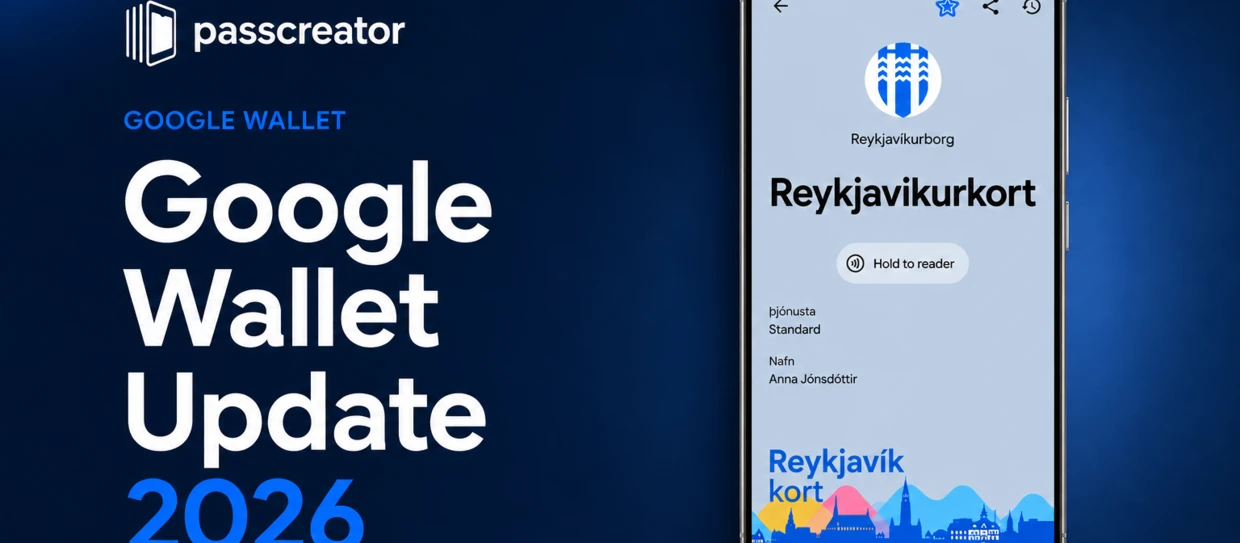
Google Wallet has received a second relevant visual update in 2026. While the April redesign further down this article changed the Wallet home screen, the August update changes the detailed view that users see after opening a ticket, loyalty card, membership card, or other pass.
The new design has been rolling out since 18 August 2026 with Google Wallet version 26.32.962917069. It is primarily a visual change, but it makes the way a pass is designed much more noticeable in everyday use.
What has changed in the latest Google Wallet update?
Google is rolling out the new pass view in phases. The update does not change how a pass is issued or saved, but it substantially changes how individual passes are displayed once they are opened.
The new pass view: Full-screen color instead of a card
The most noticeable change affects the background of an individual pass.
Before: A pass appeared as a separate card against a neutral app background. Its own color was visible, but it occupied a relatively small part of the screen.
Now: The pass background color fills the entire screen. The controls within the pass view are tinted to match, creating a much more immersive and branded appearance. An airline boarding pass, for example, can now color the whole view in the airline’s brand color.
Logo and hero image: More room in the pass view
The new design also gives the standard logo and hero image more presence. The logo is displayed prominently near the top in a circular frame, while the hero image becomes a larger, full-width element below the central pass information.
For pass holders, this makes the pass easier to recognize at a glance. For issuers, it means that images which worked as narrow banners in the former card view can look very different in the new layout.
Switch back to the old view, temporarily
Google Wallet currently offers a clock icon in the pass view that lets users switch back to the previous design. This is not a permanent preference: when the pass is opened again, the new design returns.
That is useful during the rollout, but it should not be treated as a long-term alternative to the new layout.
Rollout: Not every device sees the new view at the same time
The update is enabled server-side and is being rolled out gradually. Even users with the latest version of Google Wallet may not see the new pass view immediately.
Existing passes continue to work and do not need to be reissued. The change affects their presentation in the Google Wallet app, not the validity of the pass itself.
Google Wallet pass view: Before vs. After at a Glance
| Section | Before | After |
|---|---|---|
| Pass view | Separate card on a neutral background | Full-screen, vertically structured view |
| Background color | Small visual accent | Colors the whole pass view |
| Controls | Neutral app controls | Tinted to match the pass color |
| Hero image | Narrow banner | Larger, full-width visual element |
| Logo | Header element | Prominent circular display near the top |
| Previous design | Default view | Temporarily accessible via the clock icon |
| Existing passes | Existing presentation | Still work; displayed in the new view |
What does the update mean for businesses that use Wallet passes?
Even though the August update is mainly about the design of the pass view, it has practical consequences for anyone who creates Google Wallet passes professionally. Background color, imagery, and content hierarchy become more visible than before.
1. Background color becomes a design decision
In the new full-screen view, a background color is no longer a small accent behind a card. It sets the mood for the entire pass view. Set hexBackgroundColor deliberately; otherwise, Google derives a dominant color from the logo. Calm, brand-appropriate colors are usually safer than highly saturated ones. Google automatically chooses black or white text based on contrast, and that choice cannot be controlled manually.
2. Hero images and logos need a layout review
The hero image now takes up much more space, and the standard logo needs to work in a circular crop. For generic passes, Google currently recommends a 1032 × 812 px PNG hero image in approximately 5:4 format, without embedded text. Check existing banner-style images, safe margins in logos, and contrast against the full-screen background.
3. Clear content becomes more important
A full-screen pass can communicate a brand more strongly, but it also makes overloaded layouts easier to spot. Short programme names, clear field labels, and a focused visual hierarchy help users find the important information quickly.
4. Existing passes remain usable — but their design gets more attention
No reissue is required for existing passes. Still, the rollout is a good reason to open a representative selection of templates and review how they behave in the new view. A pass that was technically correct before may now need a small design adjustment to look as intended.
Update April 2026: Google Wallet interface redesign
Google has completely revamped the Wallet app on Android. It features a new home screen, a new favorites system, improved search functionality, and more privacy options for each pass. The update has been rolling out gradually since April 2026 and changes not only the app’s appearance but also how you find, organize, and use your Wallet cards in your daily life.
Here you’ll find out exactly what has changed, what has been officially confirmed, and what the redesign means for you as a user and for businesses that use Wallet passes.
What has Google officially announced?
Google describes the update in the release notes for Google Play Services version 26.14 from April 13, 2026, in deliberately matter-of-fact terms:
The Wallet interface has been redesigned and now offers faster access, better search capabilities, and new features.
In addition, Google introduces new privacy settings per pass and per ID. This gives you more control over how individual Wallet contents interact with other Google services like Autofill.
The term “Major Update” doesn’t come from Google itself, but from the tech press, particularly 9to5Google and Android Authority. Nevertheless, one thing is clear: The update fundamentally changes how Wallet passes look and are accessed in everyday use.
The new home screen: Grid layout instead of an endless list
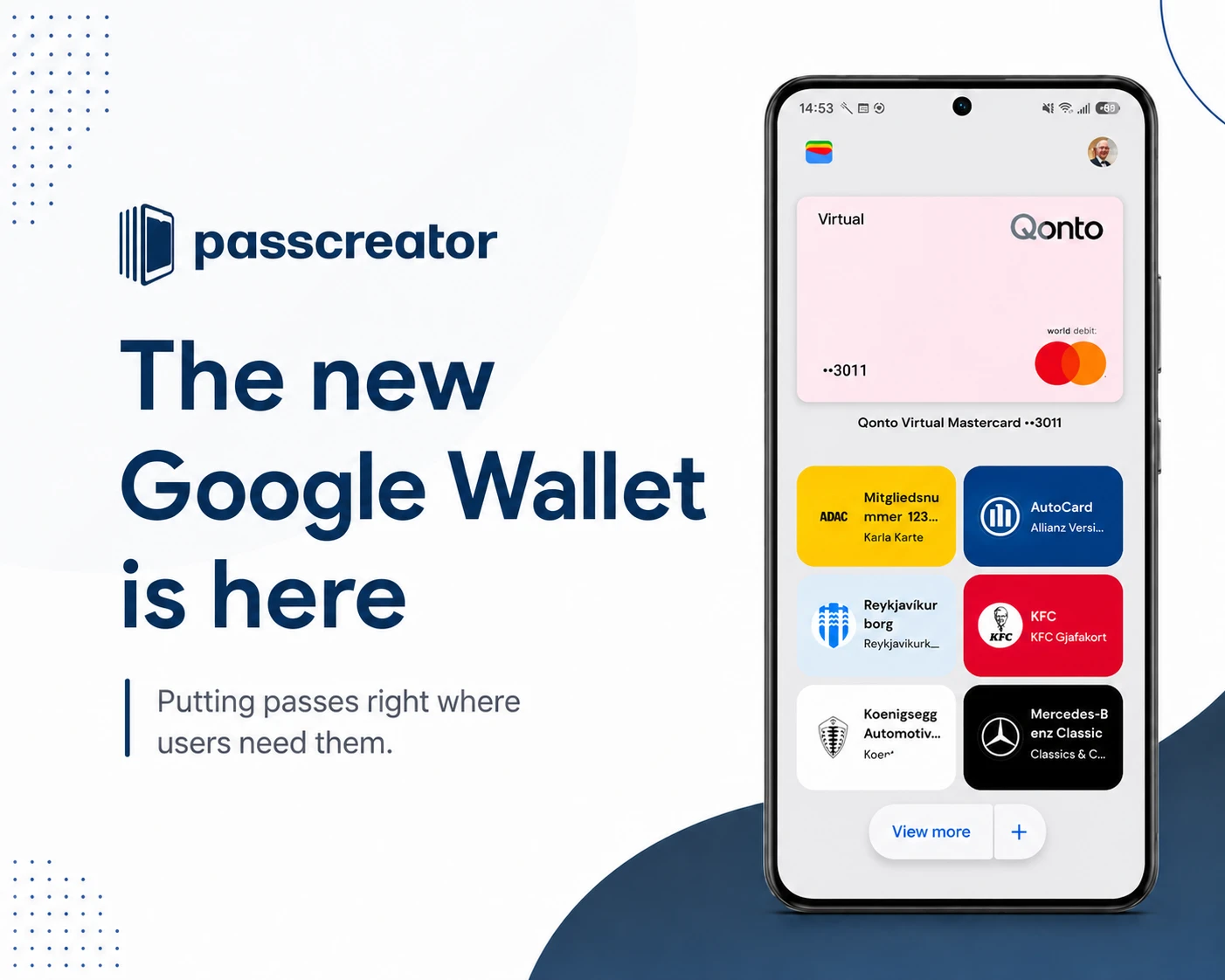
The most noticeable change affects the area below the credit and debit card carousel. The upper part of the app remains largely the same, but everything below it has been completely redesigned.
Before: Wallet cards were displayed as long, wide cards in a vertical list. Users who had saved many loyalty cards, tickets, or membership cards often had to scroll far down.
Now: Passes appear in a more compact grid layout, two per row, with color-coded and themed backgrounds. This makes individual passes much easier to distinguish, and you can access your most important cards faster.
Favorites: You decide what appears on the home screen
A key new feature is the Favorites system. You can now specifically control which passes appear on the home screen.
Android Authority describes this as a star system: Passes can be marked with a star and then appear more prominently on the home screen. Via “Manage passes on home,” you can prioritize passes, rearrange them, or add them to the home screen. Additionally, the familiar option to sort passes by holding and dragging remains.
What this changes: For example, if you regularly need your favorite loyalty card, gym membership, and rail pass, you can move exactly those cards to the top. Everything else moves to the background but remains accessible via “View more.”
Better search: Google Wallet becomes searchable
Google has significantly enhanced the search function within Wallet. The new “View more” section opens an overview page where you can search your entire Wallet: transactions, payment methods, and Wallet passes.
The pass list can be sorted alphabetically or by most recently added. Google Support documents now also show the path “Google Wallet App → View more → View more passes” and confirm that passes can be found via a search bar.
For anyone who has accumulated many loyalty cards, tickets, and memberships over the years, this is a real win. No more endless scrolling to find a specific card.
New single-card view: More info at a glance
It’s not just the home screen that’s been revamped. Android Authority reports that the display of individual cards and passes has also been redesigned. Initial tests revealed a more colorful pass view with more information right on the first page: name, number, date added, and shortcuts to pass-related settings.
This is especially relevant for passes that need to be quickly accessible in everyday life: the digital loyalty card while shopping, the gym membership card, or proof of insurance during a doctor’s visit.
Note: Some of these details are based on early observations and tests. Not all users will necessarily see exactly the same detailed view.
New “Add to Wallet” button
A small but noticeable UI detail: Google has replaced the large plus floating action button in the bottom right corner with a centered split-button variant. The plus on the right side still leads to the familiar “Add to Wallet” screen.
This shows that Google is not only reorganizing passports but also revamping the navigation and entry points within the app.
New privacy options per pass
The official Google update from April 2026 explicitly mentions new privacy settings for individual Wallet items. You can now specify how private passes and IDs interact with other Google services like Autofill.
Google also explains in the Wallet Help section that you can set whether passes may be used within other Google products such as Google Maps, Calendar, or Chrome. This setting is enabled by default but can be disabled on a per-pass basis.
What this means in practice: If you don’t want your concert ticket to appear in Google Calendar or your loyalty card to be suggested in Chrome, you can now control this on a case-by-case basis. This is a positive step toward giving users more control.
Google Wallet Redesign: Before vs. After at a Glance
| Section | Before | After |
| Home | Long vertical list, wide cards | Grid layout, two cards per row, more compact |
| Sorting | Drag-and-drop | Drag-and-drop plus favorites system with star |
| Search | Limited | New search bar for passports, transactions, and payment methods |
| Single view | Simple layout | More colorful display, more information on the first page |
| Navigation | Large plus button in the bottom right | Centered split button, more compact navigation |
| Privacy | Global settings | Controllable per pass: Use in Maps, Calendar, and Chrome can be controlled individually |
+ Nearby Passes Notifications: The right pass in the right place
Nearby Passes geofence notifications have been available for all standard pass types in the Google Wallet API since October 2025. Businesses can define up to 10 locations per class and object. When you approach one of these locations (such as a store or an event venue), Google Wallet displays a push notification on the lock screen, making it easier to access the relevant pass.
Prerequisite: You must have notifications enabled and have granted Google Wallet permanent location access. Then Wallet can proactively display the right pass at the right time.
Google describes Wallet in the Play Store as a place for “Everyday Essentials”: payment cards, loyalty cards, concert tickets, and more. The app has over a billion downloads. Quick access is available via the Wallet app, Quick Settings, Google Assistant, Wear OS, and, in some cases, the lock screen.
The direction is clear: Google Wallet is evolving from a digital card holder into a context-aware access point for everyday life. Payments, admission, customer loyalty, IDs, keys, and digital identity are all set to converge in one place over the long term.
What does the redesign mean for businesses that use Wallet passes?
Even though this article primarily explains the update itself: If you work with Wallet cards professionally—for example, as a marketer, product manager, or developer—it’s worth taking a look at the strategic implications.
1. Visibility becomes a competitive factor
In the new grid layout, good pass design matters more. The logo, color, and name must work effectively in a small space.
2. Reusability beats one-time saving
A pass without a clear reason for reuse is not prioritized in the favorites system. Loyalty cards, coupons, and memberships need specific occasions to be used regularly.
3. Location and timing are becoming more relevant
Nearby Pass notifications make Wallet passes more context-aware. This is particularly exciting for retail, events, and location-based offers.
4. Wallet cards are becoming part of the Google ecosystem
Passes can appear in Maps, Calendar, and Chrome. This opens up new touchpoints but also requires that privacy issues be properly addressed.
5. The real point: dynamism instead of static
Wallet passes can be updatable, discoverable, and contextually usable. Companies that leverage this create a better customer experience. Companies that view passes merely as digital copies of plastic cards are missing out on the potential that Google is bringing even more to the forefront with this redesign.
Creating and optimizing Wallet passes: How Passcreator can help
If, after reading this article, you’re considering using Wallet cards for your business or optimizing existing passes for the new Google Wallet, the question quickly arises: How do I implement this technically?
Passcreator is a platform for creating, distributing, and managing digital wallet cards such as tickets, vouchers, coupons, membership cards, and loyalty cards that are compatible with Apple Wallet and Google Wallet.
Specifically, Passcreator addresses exactly the points that become more important with the redesign:
Design that works in a grid layout: With the user-friendly graphical editor, you can create wallet cards online, even without programming knowledge. You choose from a variety of templates and features and effortlessly add fields, links, and images for various use cases. This ensures that your pass’s logo, colors, and name make an impact at first glance in the new, more compact layout.
Dynamic updates for the favorites system: Each wallet card can be modified or updated at any time after being saved on the smartphone. You have full control over images, text, and card types. This is exactly what it takes to get users to add your pass to their favorites: consistent relevance rather than a one-time save.
Push notifications and location-based alerts: By adding GPS coordinates to your wallet cards or connecting iBeacons, your card automatically appears on the lock screen as soon as your customer reaches a specified location. This works seamlessly with Nearby Passes Notifications, which Google has enabled for all pass types since October 2025.
Integration with existing systems: With the workflow engine integrated into Passcreator, you can easily connect your existing systems without any programming knowledge. Hundreds of pre-built integrations are available to you. For larger projects, the API is available for custom integrations. Whether it’s a CRM, e-commerce platform, or ticketing system: The connection works via Zapier, the workflow engine, or directly via the REST API.
Passcreator is a Google Wallet Premier Partner and is used by companies such as ADAC, Mercedes-Benz Consulting, Hamburger SV, and the Academy of Motion Picture Arts and Sciences (Oscars). There is a free trial version that lets you test the tool before committing.
Conclusion: Wallet passes will become an everyday companion in the new Google Wallet
The 2026 redesign makes Google Wallet clearer, more searchable, and more context-aware. For users, this means: You’ll find your Wallet cards faster, have better control over what you see, and have more control over your data.
For businesses, the perspective is shifting: Wallet passes are no longer just a digital storage space, but a channel that rewards visibility, relevance, and good design. Anyone using Wallet cards for customer loyalty, events, memberships, or coupons should take the redesign as an opportunity to review and optimize existing passes.
Passcreator is a Google Wallet Premier Partner and helps businesses of all sizes create Wallet cards for Apple Wallet and Google Wallet. If you’d like to know how to set up Wallet cards for your business or optimize existing cards for the redesign, feel free to reach out to us at hello@passcreator.com.