
Webhooks
Webhooks let Passcreator notify your own systems when something happens, for example when someone creates, saves or scans a pass. Instead of polling the API, your endpoint receives a payload for every event you subscribe to. In pull mode your system retrieves the payloads instead.
Creating a webhook
- Go to Integrations in the sidebar.
- Open the Create dropdown and choose Webhook.
- The creation wizard walks you through the following settings.
- Event is the event you subscribe to. The list below shows all events.
- Template restricts the webhook to a specific template. Choose All Templates to cover every template.
- Target URL is the URL of your endpoint that receives the payloads in push mode.
- Retry makes the webhook repeat the request when it receives a response with an HTTP status higher than 399.
- Delivery Mode is Push or Pull. The section below explains both modes.
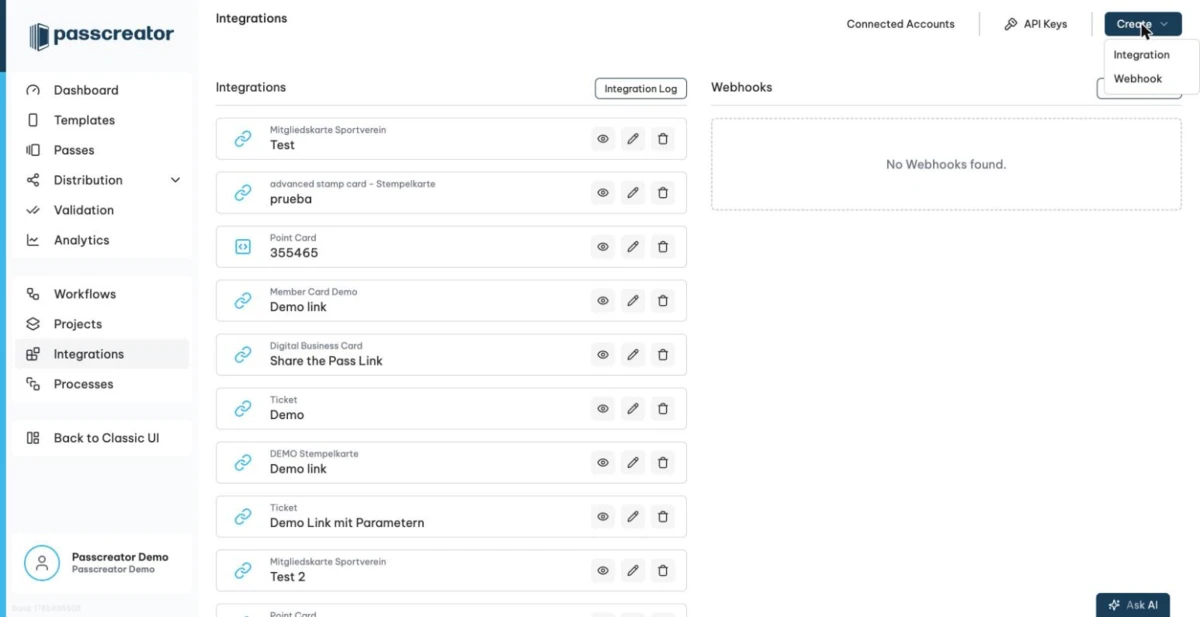
The Integrations page lists your webhooks below the integrations.
Available events
| Event | Fires when |
|---|---|
| Pass created | Someone creates a new pass. The source does not matter, whether API, form, bulk process or integration. |
| Pass updated | The data of a pass changes. |
| Pass saved on Device | Someone adds a pass to a wallet on a device. |
Pass saved on Device (first time) | Someone adds a pass to a device for the very first time. |
| Pass removed from Device | Someone deletes a pass from the wallet of a device. |
| Pass voided | Someone voids a pass. |
| Pass scanned | Someone scans a pass, for example with the Smart Scan app. |
| Template created | Someone creates a new pass template. |
| Template updated | Someone changes a pass template. |
| Audit Log changed | Passcreator writes a new audit log entry. |
| Message sent | Passcreator delivers an email or SMS message. |
| Message failed | An email or SMS message fails to deliver. |
Push and pull delivery
- Push mode sends payloads to your Target URL in real time. Choose it when your system is reachable from the internet and you want immediate notifications.
- Pull mode stores payloads so that your system retrieves them via the API at its own pace. You fetch them from the endpoint
GET /api/v3/webhook-payloadand authenticate with an API key. Use pull mode when your system sits behind a firewall or when you prefer to process events in batches.
Retries
With Retry enabled, Passcreator repeats the delivery if your endpoint responds with an HTTP status of 400 or higher. Let your endpoint return a 2xx status once it has accepted a payload. Passcreator then does not deliver the same payload again.
Monitoring webhook deliveries
To see what your webhooks have delivered, open the log.
- Open the profile menu at the bottom of the sidebar and go to Logs.
- In the Select a Source dropdown, choose Webhooks.
The log shows the date and time, the result as Success or Error, the HTTP status, the webhook that fired and the payload details.
Next step
Continue withIntegration options overviewChecked 2026-08-20 · Documentation